



























Powerhouse

Connect your existing tools

Activepieces support brings 700+ ready-made connectors, plus Powerhouse integrations built for your industry. Nothing you run today has to be replaced.

Activepieces

700+

open-source connectors

Use any Activepieces piece

  • Gmail
  • Slack
  • Microsoft Teams
  • Outlook
  • Salesforce
  • HubSpot
  • QuickBooks
  • Stripe
  • Shopify
  • Google Sheets
  • Google Drive
  • Dropbox
  • Notion
  • Airtable
  • Jira
  • Asana
  • GitHub
  • Linear
  • Postgres
  • Snowflake
  • Tableau
  • OpenAI
  • Claude
  • Webhook

24 of them. Email, CRM, finance, storage, data and AI.

Browse all 700+ pieces

Powerhouse integrations

Built for the work your industry runs on

See all integrations

And turn them into reliable enterprise apps

Combine with auditable data models, controlled execution flows and more.

  1. TriggerInvoice arrives inPaperless-ngx
  2. BranchClassified as an invoice
  3. ReadFields read by a model
  4. WriteFile the invoice record
An invoice record: three line items totalling 1,284.50 euros, approved.

Invoice

INV-2041

Total

€1,284.50

ApprovedDue in 14 days
DraftIn reviewApproved

Only a person can approve

Each write step names what it may change

  1. Fields extracted· AI agent
  2. Total corrected· Reviewer
  3. Invoice approved· Finance lead
Workflow
The integration moves the event.
Data
A typed record holds what it carried.
Business logic
Rules and people decide what changes.
How the platform fits together

Enterprise apps built this way

Each one pairs a professional system with a document model and an app, and adds Activepieces pieces where the workflow needs them. Open one for the full detail and how to run it.

Operations

Paperless-ngxRunnable demo

An invoice arrives as a PDF and leaves as a structured record that interfaces, APIs and AI tools can work with.

  1. 01Paperless classifies a document as an invoice
  2. 02A language model reads the invoice fields
  3. 03An invoice record is filed for review
  4. 04Approval and payment stay with their own workflows

The recipe in this case

  1. SystemPaperless-ngx
  2. Connectorpaperless-sync
  3. Document modelInvoice
  4. AppBilling dashboard
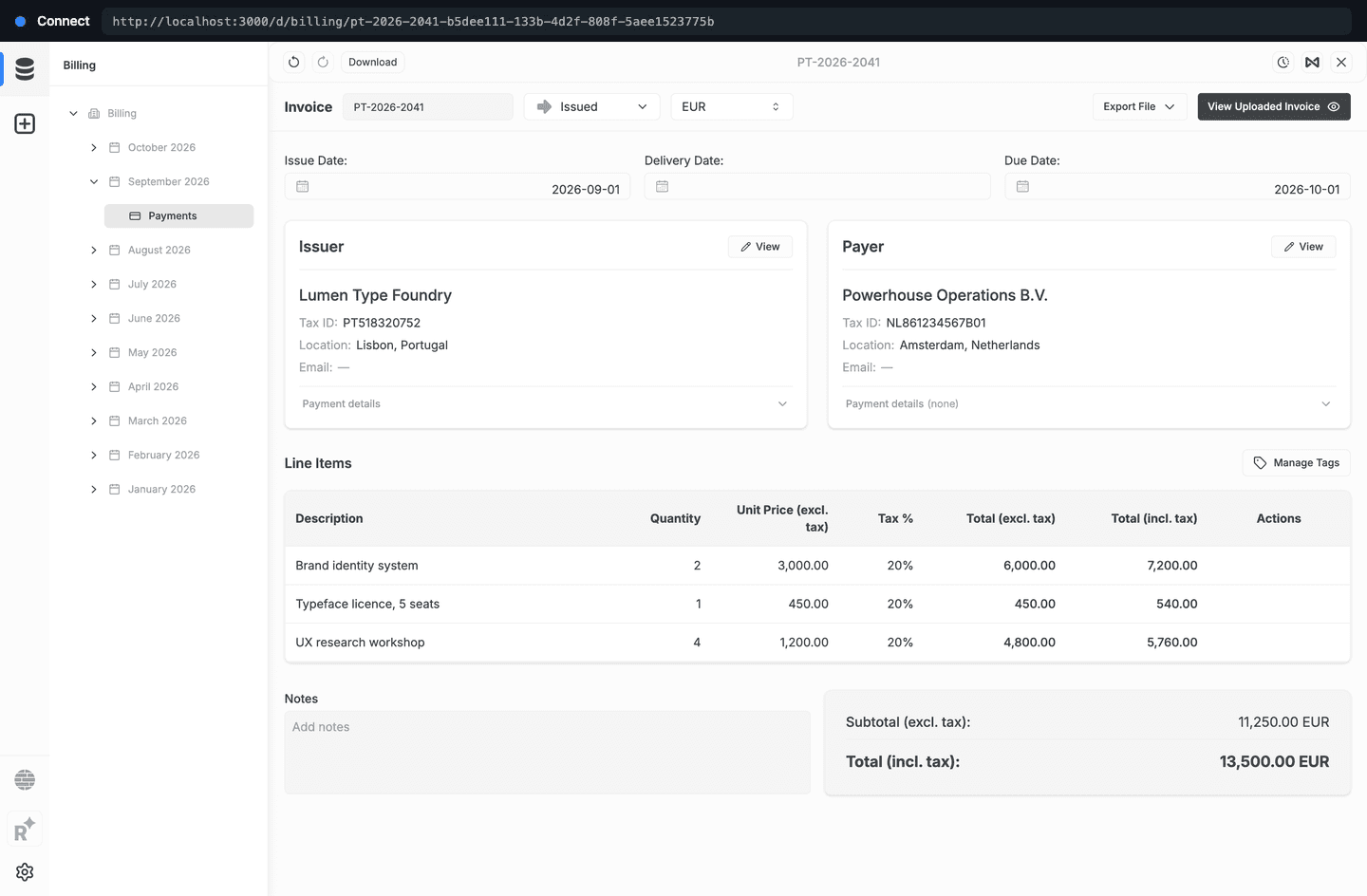
The invoice open in Powerhouse Connect, under a September 2026 month in the Billing drive: issuer, payer, issue and due dates, currency, and three line items with a total of 13,500.00 EUR.

Manufacturing

UMHRunnable demo

A purchase order becomes a commitment a person approves, and the factory floor reports back against it.

  1. 01A purchase order arrives in Paperless
  2. 02A Production Ledger is drafted from it
  3. 03A person approves the order
  4. 04The order is created on the factory floor
  5. 05Floor progress lands in the evidence trail

The recipe in this case

  1. SystemUMH factory floor
  2. ActivepiecesUMH · Paperless · OpenRouter
  3. Document modelProduction Ledger
  4. AppConnect
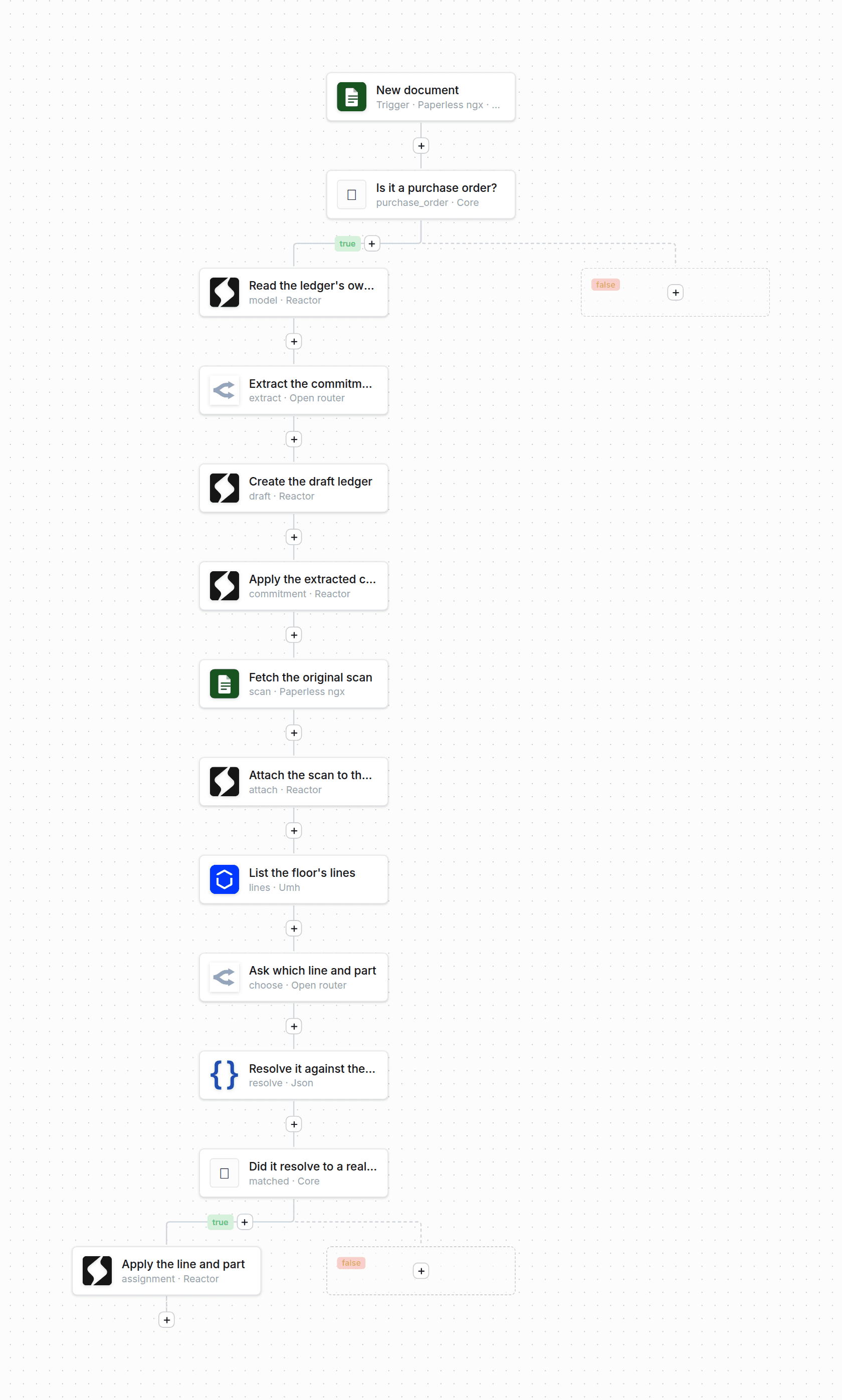
The Workflow Studio canvas for the workflow that drafts a ledger from a purchase order: a Paperless trigger, a purchase-order branch, then twelve blocks down to applying the resolved line and part.

Operations

DoclingRunnable demo

A document is converted to markdown, split along its own headings, and each section a person keeps becomes a source queued for extraction.

  1. 01A file is dropped on the vault's Intake view
  2. 02Docling converts it and splits it at its own headings
  3. 03A person confirms which sections to keep
  4. 04Each kept section is filed as a source

The recipe in this case

  1. SystemDocling
  2. Connectordocling-service
  3. Document modelKnowledge source
  4. AppKnowledge Vault
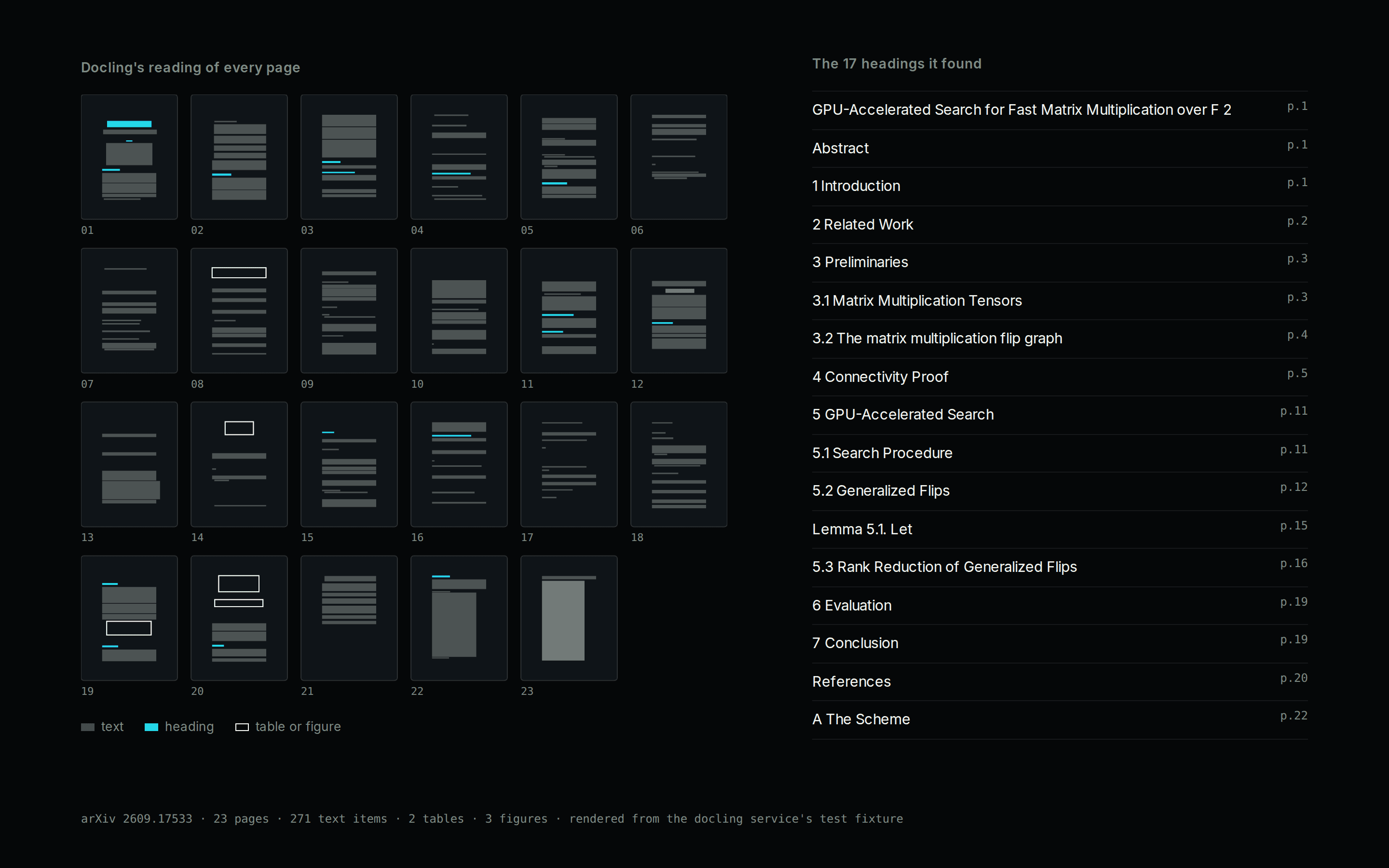
Docling's layout reading of a 23-page arXiv paper: every page drawn as its text blocks, headings, tables and figures, beside the 17 headings it found with their page numbers.

Construction

SpeckleRunnable demo

A building model's revisions become a record of its quantities and of what changed, element by element, while the geometry stays in Speckle.

  1. 01A person runs a sync from the Sync Console
  2. 02Each model and revision is mirrored
  3. 03Volume, area and length are totalled per category
  4. 04Changes between revisions are recorded; nothing is written back

The recipe in this case

  1. SystemSpeckle
  2. ConnectorSync runner
  3. Document modelSpeckle Project
  4. AppModel Explorer
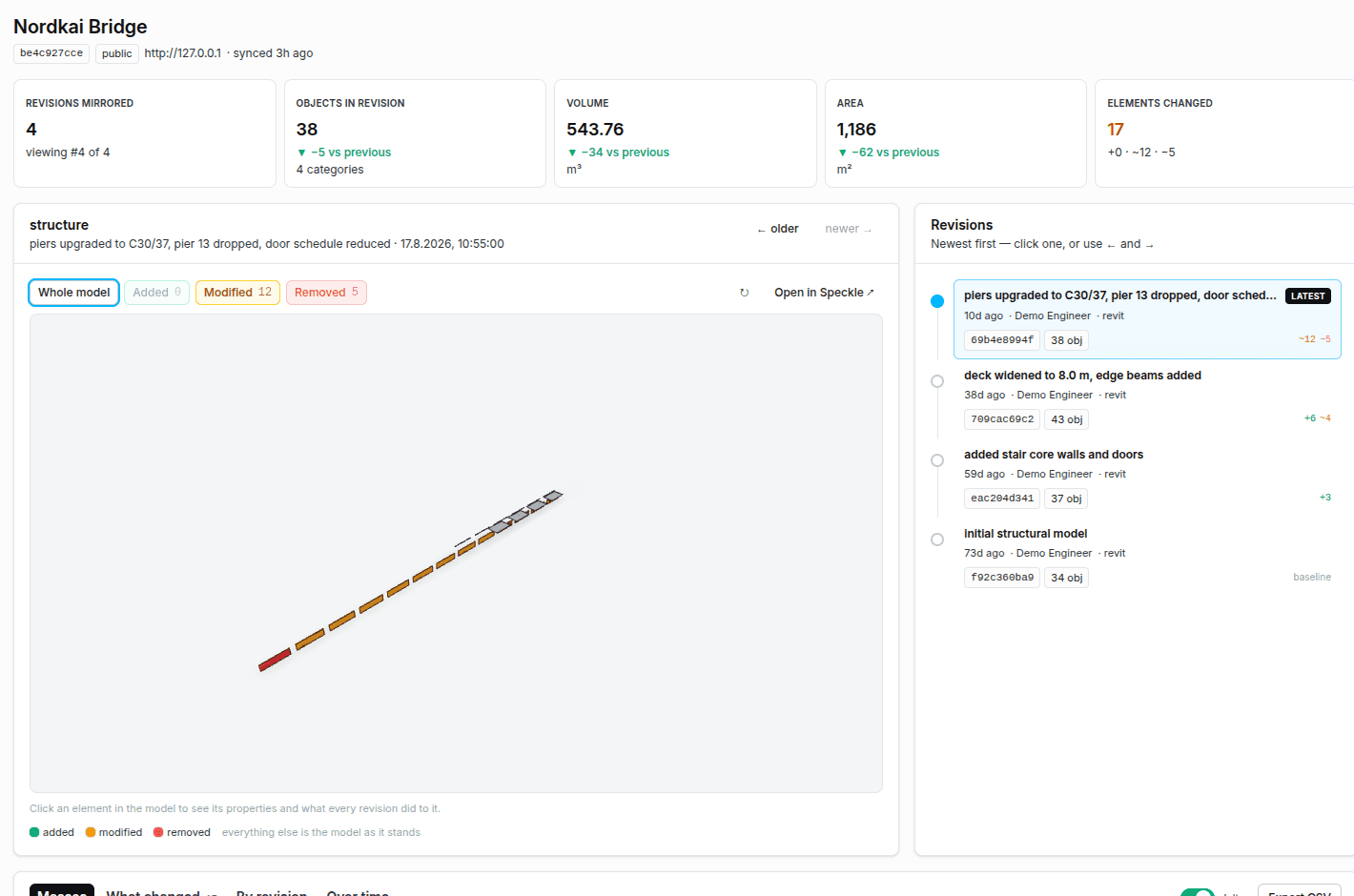
The Model Explorer: a list of mirrored revisions, the building model with its changed elements coloured, and the revision timeline below.

Financial

DistyraIn development

European bank statements and PSD2 streams become typed transaction records, with each counterparty recognised the way European formats write it.

  1. 01Distyra Connect reads a bank statement or a PSD2 stream
  2. 02Distyra Enrichment names the counterparty and categorises each transaction
  3. 03Each transaction is filed as a typed record for review

The recipe in this case

  1. SystemDistyra
  2. Document modelBank transaction
  3. AppConnect
  • PRLV SEPA ORANGE SA 660198447−€59
  • CARTE 03/04 SNCF INTERNET PARIS−€78
  • VIR INST RECU STRIPE PAYMENTS UK+€3,180
  • VIR SEPA ACME SARL FACT 2024-0912+€12,400
A

Acme SARL

Customer payment · FR

+€12,400
Distyra’s own example, from distyra.eu

Hundreds more through the Activepieces catalogue

Activepieces is an open-source catalogue of several hundred pieces. Each piece connects one service. Its triggers start a workflow, and its actions do something in that service. Powerhouse runs the catalogue on your Switchboard, so a piece can feed any workflow.

What Powerhouse adds to a piece

A piece passes an event from one service to the next. Powerhouse gives that event somewhere to land.

Models for your industry
Invoices, production ledgers, knowledge sources. Each is a typed record with named fields and the stages it moves through.
Structured data
What a workflow reads lands in a record your team, your reports and your AI tools all query the same way.
People approve
Each workflow step names what it may change. Approval and sign-off stay with a person.
A full history
Every change is kept on the record, with when it happened and who or what made it.

Install an integration

Every integration installs onto a Switchboard. You need one before you start.

Read the step-by-step guide
  1. 01

    Run a Switchboard

    The Powerhouse server that holds your documents and runs workflows. Host it yourself, or use a managed one on Vetra Cloud.

  2. 02

    Install the packages

    Each record lists its packages. Install them from the Vetra registry, together, at the versions the record names.

  3. 03

    Turn on Workflows

    Only for integrations built from pieces. Workflows is an add-on for the environment, and it loads each piece from the registry when a workflow runs.

  4. 04

    Open it in Connect

    The records the integration writes appear in a drive, ready for a person to review.

Connect the system you already run.

Tell us which system holds the workflow, and we will walk through what entering the structured layer would look like.