Powerhouse

Turn operational workflows intosoftware you own.

Powerhouse transforms sensitive, document-heavy processes into structured applications. With permissions, approvals, and attributable history built in. Your teams and AI can work together without giving up control of your data.
Explore the docs

Siloed data limits
what AI can deliver.

Critical processes are spread across documents, spreadsheets, inboxes, and legacy systems. Without shared structure and controls, AI lacks the context needed to work reliably.

AI works from fragments
Documents, spreadsheets, emails, and system records rarely provide one complete, trusted view of the workflow.
Sensitive data crosses unclear boundaries
Confidential information can be copied into external AI tools before access, storage, and approval policies are established.
Decisions are difficult to audit
Teams need to know which source, person, model, or rule changed the state of the work.
Receipts
$182.40
Invoices
Finance system
Claim status
In review
Legacy tracker
AI
Emails
Inbox
Changed by · unknown
Source · missing
Approval · not recorded
No accountable history of who changed what

How Powerhouse works

Structure the workflow.
Control the boundary.

Powerhouse turns your private processes into AI-ready software that you own. Explore solutions in a Powerhouse sandbox, then choose local, self-hosted, or remote deployment according to your needs.

Receipts

$182.40

Invoices

Claim status

In review

Emails

01

Connect existing systems

Start from the documents, spreadsheets, inboxes, and legacy systems already carrying the work.

Your boundary

You control which users and what systems access your data.

Receipts & invoices
Claim status
Email correspondence
02

Structure the workflow

Model the objects, approvals, permissions, exceptions, and data history behind the process.

Local models
Receipts & invoicesClaim statusEmails
2 operators only
Frontier models
Claim statusEmails

Non-confidential data only

03

Add scoped AI assistance

Use AI to extract, compare, draft, flag, and route work inside the approved workflow boundary.

Local models: confidential financial data, approved operators only
Frontier models: claim status and non-confidential correspondence
Output

Batch · 24 documents

Claim #4821Approved
04

Keep human approval

Operators approve, reject, or revise important actions with the right context in front of them. Here, an operator approves the batch claim and updates the claim status.

Receipts extracted · AI agent
Amounts verified · Wouter K
Batch claim drafted · AI agent
Batch approved · Wouter K
Claim #4821 status updated · Approval Team
05

Retain attributable history

Every source, rule, model output, and human decision remains inspectable as the workflow evolves.

A form is only
the interface.

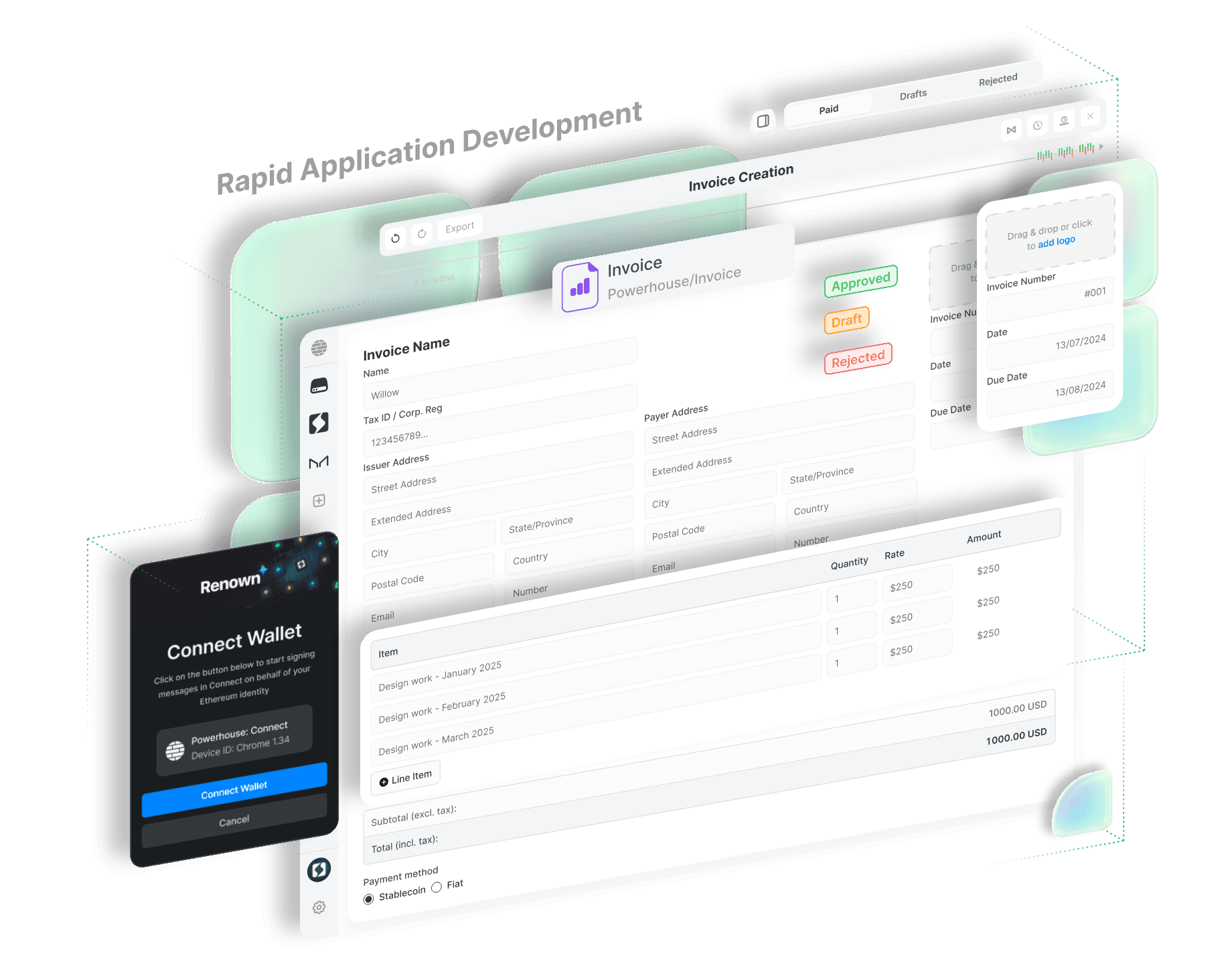
This invoice application is powered by a typed document model. Approval states, identities, calculations, history, and exports are part of the application, not conventions held in a spreadsheet or someone's head.

Powerhouse invoice application shown as an exploded layout: an invoice form with issuer and payer fields, approval state badges, a line item table with quantity, rate, and amount, totals, payment method, a Renown wallet connection panel, and paid, drafts, and rejected queues.
Powerhouse invoice application. Select a marker to inspect what each part of the record does.

01 / 07

Document model

Invoice is one typed document model in the Powerhouse namespace. The schema defines what a valid record looks like, rather than a spreadsheet convention held in someone's head.

Control is visible
in the workflow.

Powerhouse turns access, storage, approvals, exports, and history into product surfaces your team can inspect and operate.

Powerhouse product screenshot showing a service offering with pricing tiers, billing cycles, and configured service groups.
A service offering document and its verifiable revision history, with signed operations and inspectable payloads.
Access is scoped to the workflow
Objects, roles, and approval state define who or what can see, change, or route work.
Ownership stays portable
Data, schemas, exports, and workflow state remain inspectable and usable outside a single vendor surface.
Approvals stay human-readable
Exceptions, review state, and operator decisions are part of the record rather than buried in inboxes.
History remains attributable
Source links, exports, status changes, and provenance are visible as first-class product surfaces.

Adopt it on your terms,
next to what you already run.

Deployment, tooling, and model choices stay with your team. Powerhouse connects to your existing systems instead of asking you to replace them.

Private deployment options

Choose local, self-hosted, or managed deployment according to the sensitivity and operational requirements of each workflow.

Open-source stack

Powerhouse is the open-source platform for owned operational software. Your team can inspect, extend, and operate the system.

Model choice

Scope assistance to the model and deployment path that fits the task, then change that choice as needs and policy evolve.

No rip-and-replace requirement

Powerhouse connects to existing systems and turns the valuable workflow into owned software over time.

Part of the Powerhouse Stack

Tools that make distributed work local-first and private.

Achra, powered by Powerhouse

A decentralized services & operations platform. Start your organisation, hire operators, find builders and offer your local-first products, platforms and agents to the world.

Services platform

Visit Achra
Powerhouse

Open-source infrastructure and tooling for distributed organisations and local first apps, platform & agents.

Host applications

  • ConnectFront-end
  • SwitchboardBack-end
  • RenownIdentity
Visit Powerhouse
Vetra, powered by Powerhouse

Builder tooling platform for the local-first infrastructure stack of Powerhouse. Packages, cloud environments and rapid application development.

Builder tooling

Visit Vetra

Start with a workflow assessment.

Find out where Powerhouse can improve operational efficiency. We map the first workflow before a build starts.

Explore the docs