
DoclingWhole documents, split where the author split them.
A document is converted to markdown, split along its own headings, and each section a person keeps becomes a source queued for extraction.
Document conversionRunnable demo
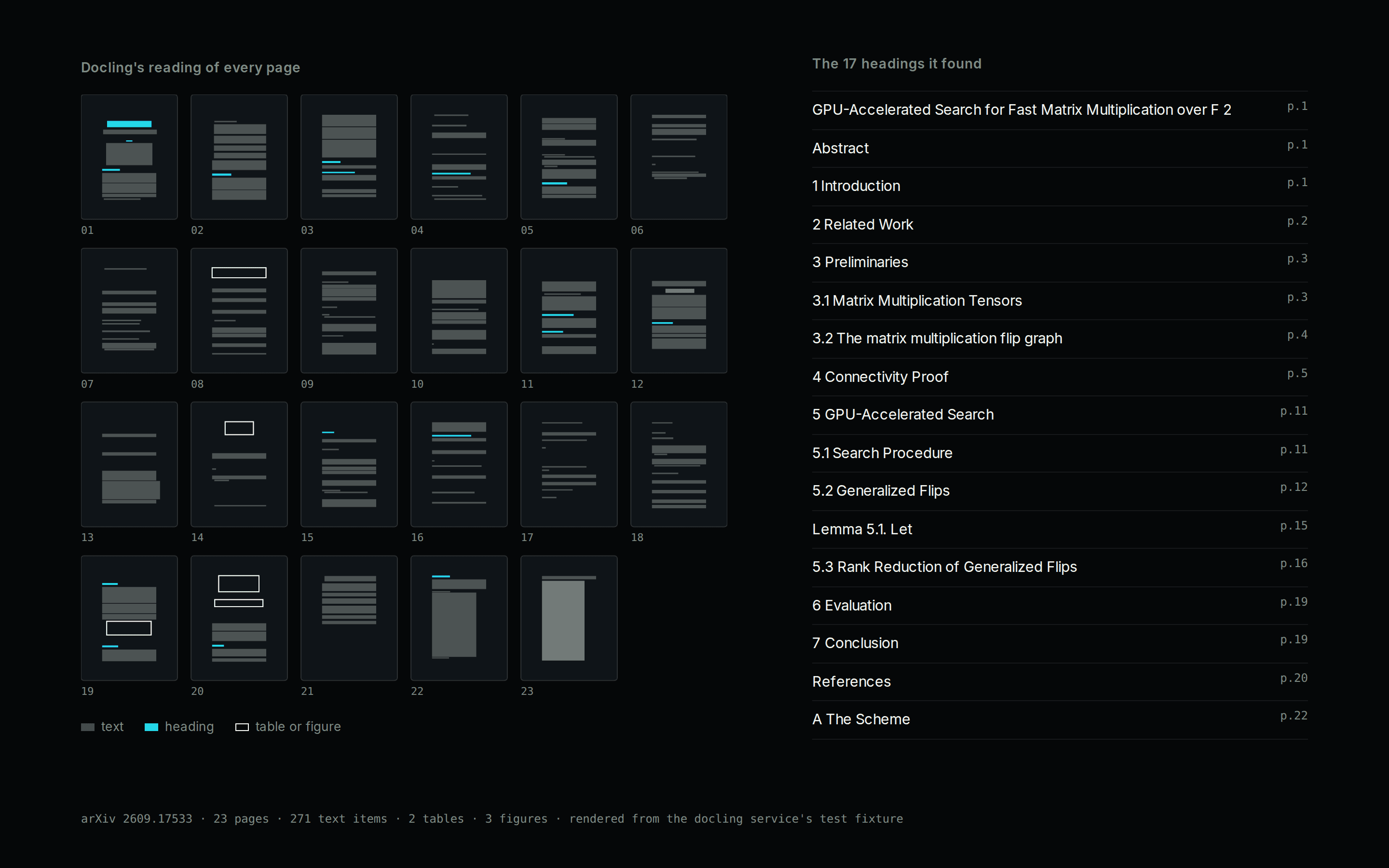
The boundary
The service knows formats and the vault knows sources. Docling returns markdown and chunks and has never heard of a source; the vault decides what one is. That keeps the converter replaceable, and keeps vault rules out of a process that only reads files.
Converting writes nothing. The vault cuts the document at the shallowest heading level that actually divides it, shows the proposed sections, and files only the ones a person keeps. A 400-page book becomes its parts, not the thousands of chunks the converter emits.
Conversion runs in its own container, apart from the Switchboard, and only a signed-in caller can start one. A long book takes minutes of compute, so an anonymous request is refused even on a vault with authentication switched off.
- Data in
- PDFs, scans, Office files and HTML, 29 formats in all
- Structure
- One source per section, cut at the document's own headings
- Access
- Converts and proposes. Nothing is filed until a person confirms
- Direction
- One way in. Files are converted and filed as sources; nothing is written back to the file or to the service.
How material gets in
- Files dropped on the vault's Intake view: PDF, scans, Word, PowerPoint, Excel, HTML, EPUB and the rest of the 29 formats, up to 30 MB each.
- Anything else that can send bytes to the vault's convert route with a signed-in bearer, which reaches the same service the app does.
The document model
This is the structure the integration writes into. The fields are the same whether a person opens the record, an application queries it, or a scoped agent reads it.
- title
- String
- The section's own heading, taken from the document.
- content
- String
- The section's markdown, with its figures attached.
- sourceType
- Enum
- ARTICLE, PAPER, BOOK_CHAPTER and five more, chosen per file at review.
- provenance.method
- String
- Always converted, so a converted source is never mistaken for a hand paste.
- provenance.tool
- String
- docling.rs, the engine that read the file.
- status
- Enum
- Position in the lifecycle below. A published source arrives queued.
- extractedClaims
- Array
- The notes later extracted from this source.
Lifecycle
- inbox
- extracting
- extracted
- archived
Every transition is a signed operation on the record, so the history of the document is the audit trail.
How it runs
- 01ConvertThe file goes to the vault's convert route, which passes it to the service. Its extension picks the parser. Office files, HTML and text need no models and convert at once.
- 02Read a PDF, cheapest firstDocling's own pass reads born-digital pages and plain scans. A garbled text layer falls back to pdf.js, then to Tesseract or Docling's bundled OCR, and the response names the step that produced the text.
- 03Measure what survivedThe service counts how much of the PDF's own text reached the markdown, and lists the formulas and pictures it saw but could not transcribe.
- 04Review the sectionsThe vault proposes one section per heading group and folds very small ones into their neighbours. A person unticks what they do not need and picks the source type.
- 05File and queueEach kept section becomes a source in a folder named after the file, with its figures attached, queued for extraction into notes.
Where the result shows up
One record, reachable from several places. The archive keeps the original document, and the structured state is available wherever the work happens.
- Knowledge Vault app
- Drop files, read each proposed section, untick the ones to leave out, and file the rest.
- Switchboard
- The convert subgraph reports whether a service is configured, whether PDFs are ready, and which formats it reads.
- Service health
- GET /health tells a broken service apart from one still waiting for its PDF models, and the vault shows both states.
Convert a file against the service directly
curl -s -X POST "http://localhost:5011/convert?filename=report.pdf" \
--data-binary @report.pdfRun it yourself
The example is published as a repository you can clone and run against your own reactor.
What you need
- Docker, or Bun to run the service without a container.
- About 700 MB of models on a volume for PDFs and images, fetched once with npm run fetch-models. Every other format converts without them.
- A Knowledge Vault whose Switchboard points at the service through CONVERT_SERVICE_URL.
- Memory sized to the largest document rather than to traffic. A 238-page book peaked at 9.6 GB, so allow about 12 GB.
- A reverse proxy that allows long requests and large bodies. nginx defaults to 60 seconds and 1 MB; deploy/nginx.conf in the repository has working settings.
Packages installed
- @powerhousedao/docling-service
- The conversion service, published as a container image to cr.vetra.io and GHCR rather than to npm.
- docling.rs
- The native conversion engine the service runs, built for glibc on x64 and arm64.
- pdfjs-dist
- Reads a PDF's text layer for the fallback step and for the coverage check.
- bai-knowledge-note
- The vault package: its convert subgraph, the Intake view and the source model.
Limits worth knowing
- One conversion runs at a time per instance, because the models are mutable sessions. A second caller is told to retry, so throughput comes from more replicas.
- A long document holds one HTTP connection for minutes. The service writes a keep-alive byte so proxies do not cut it, which means an error after that first byte arrives as a 200 with the real status in the body.
- Chunking converts the file a second time, chosen because the cheaper path paired table cells wrongly. On a 238-page book that is 155 seconds converting and 178 seconds chunking.
- Display formulas are located and kept as pictures rather than decoded. Decoding 79 formulas on a CPU did not finish in ten minutes.
Start with a workflow assessment.
Find out where Powerhouse can improve operational efficiency. We structure the first workflow before a build starts.
All integrations